Why It Exists
A page on a website has one address as far as the owner is concerned. To a search engine it can have several. The same homepage can be reached as http and https, with www and without, as a bare slash and as index.php, and with any tracking code a Facebook post or an email campaign tacks onto the end. Every one of those is a different address, and Google has to decide whether they are different pages.
When it decides wrong, the ranking the page earned gets divided between copies. Links from other sites land on different versions. The copy Google picks to show might be the http one, or the one with a tracking code in it. The canonical tag ends the guessing by stating, on the page itself, which address counts.
What It Looks Like
It is a single line in the head of the page, invisible to a visitor.
<link rel="canonical" href="https://gableexterior.example/">
Every copy of the page carries the same line pointing at the same address. The version with www, the version with the tracking code, and the real one all say the real one is canonical. Google folds them together and credits the one address with everything the others earned.
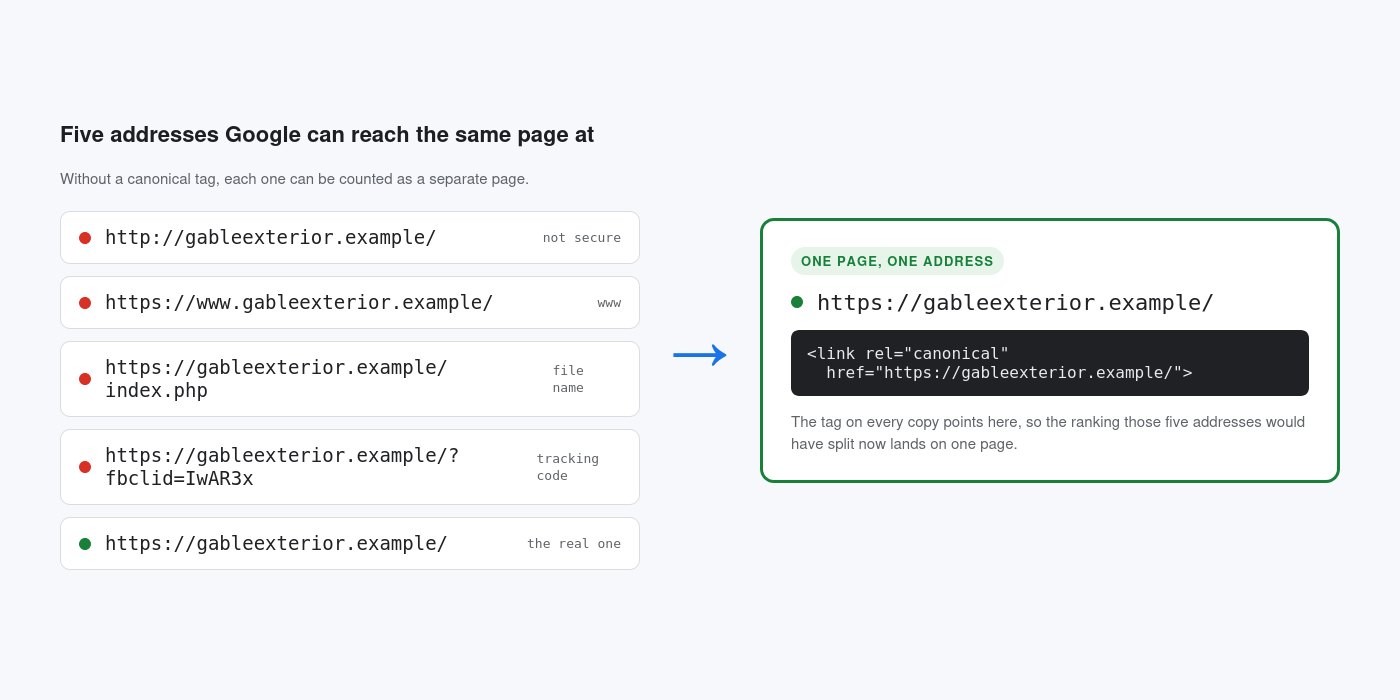
The Rules That Matter
Every public page gets one, pointing at its own preferred address, always https, always on the host the site enforces. If the site redirects www to the bare domain, the canonical uses the bare domain. If an older site was established on www and still redirects the other way, the canonical stays on www. The tag has to match what the server does; a canonical that disagrees with the site's own redirects is a contradiction Google resolves on its own.
Tracking codes and session parameters never appear in a canonical address. A page reached through a pretty address like /services always canonicalizes to the pretty address, never to the internal file it maps to.
Pages in a series point at themselves. Page two of a blog archive canonicalizes to page two, not to page one. Pointing every page of a series at the first tells Google the rest are duplicates, and their content can drop out of the index.
When It Goes Wrong
The common failures are quiet. A site built on a staging address goes live with every canonical still pointing at the staging domain, so Google is told the real site is a copy of a site that no longer exists. A template puts the homepage address in the canonical of every page, so the whole site is declared a duplicate of the homepage. A site that switched to https keeps http canonicals, so the secure version Google would prefer is marked the copy.
None of this is visible from the browser. The site looks fine. The rankings slowly go to the wrong address or to nowhere.
How To Check It
Right click any page, choose View Page Source, and search for the word canonical. There should be exactly one, and the address in it should be the one that loads in the browser bar, https, on the right host, with nothing extra on the end. Check more than the homepage; the failures above usually show up on inside pages first.
See it on a working build: the pressure washing page walks through the title, description and canonical tag for Gable Exterior Cleaning.
The Foundation Connection
The canonical tag is part of the Verified Identity layer of the Digital Foundation, alongside Schema and the Google Business Profile. It is the page version of the same idea: one business, one address, stated plainly so nothing has to be inferred. It costs one line per page and it is set once in the shared head of a well built site, so no page can be missed. A site without it is not broken. It is slowly handing its ranking to copies of itself.


