Websites for restaurants.
A restaurant is the one business where Google shows the menu, the hours by meal and a reserve button before anyone reaches the website. All three come from the markup, and getting the hours wrong in it tells a Tuesday lunch crowd you are closed. The site itself has one job on a Friday night: show what is being served right now, and how to get a table. Here is what a BizPinPro site for this trade carries, and why.
Why a restaurant's site is built differently
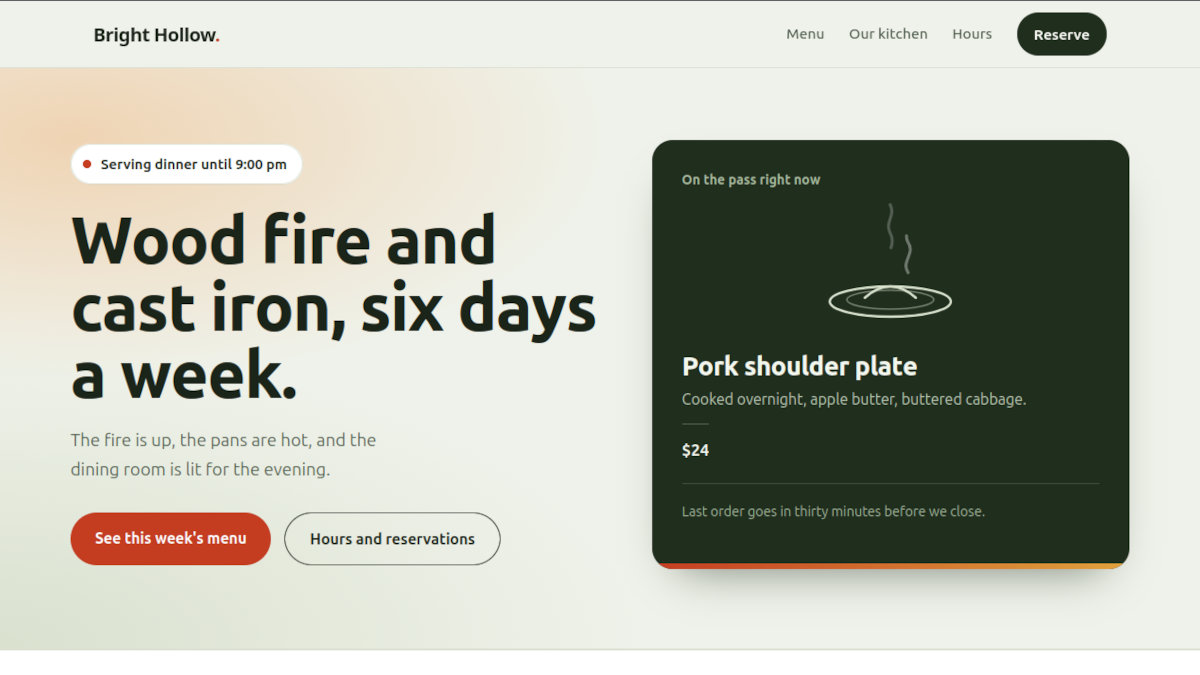
Nobody reads a restaurant website. They glance at it, on a phone, in a parking lot, to answer one question: are they open, what do they have, can I get in. The page is built to answer that in the first screen, with the hours for right now, not a table of the whole week, and the menu one tap away.
Google answers the same question for most people before they ever reach the site, from the Business Profile and the site's structured data. Hours split by meal, the menu with its sections and prices, the cuisine, and whether the place takes reservations. A restaurant that leaves those out of the markup is leaving the "breakfast near me" search to the diner across the street that put them in.
Structured data for a restaurant
Schema markup is a block of data in the page head, written in JSON-LD. For a restaurant the type is Restaurant and the shape is different from a shop or a tradesman: hours are split by meal, so Google can show "Open, lunch until 2:30"; the menu is in the markup with its sections and, where the page shows them, the dishes and prices; the cuisine is named; and the business says it takes reservations, which is what puts the reserve button on the profile. The street address and coordinates are in it, because this is a place people drive to.
The shape, shortened
{
  "@type": "Restaurant",
  "name": "Bright Hollow Kitchen",
  "telephone": "+15405550139",
  "servesCuisine": "Southern, wood-fired",
  "acceptsReservations": "True",
  "address": {
    "@type": "PostalAddress",
    "streetAddress": "(from the Google Business Profile)",
    "addressLocality": "Blacksburg",
    "addressRegion": "VA",
    "addressCountry": "US"
  },
  "openingHoursSpecification": [
    {
      "@type": "OpeningHoursSpecification",
      "dayOfWeek": [
        "Tuesday",
        "Wednesday",
        "Thursday",
        "Friday"
      ],
      "opens": "11:00",
      "closes": "14:30"
    },
    {
      "@type": "OpeningHoursSpecification",
      "dayOfWeek": [
        "Saturday",
        "Sunday"
      ],
      "opens": "08:00",
      "closes": "10:30"
    }
  ],
  "hasMenu": {
    "@type": "Menu",
    "hasMenuSection": [
      {
        "@type": "MenuSection",
        "name": "Small plates"
      },
      {
        "@type": "MenuSection",
        "name": "Mains"
      },
      {
        "@type": "MenuSection",
        "name": "Weekend breakfast"
      },
      {
        "@type": "MenuSection",
        "name": "Sweets"
      }
    ]
  }
}
Menu prices in the markup are pulled from the same list that prints the menu, so a price change on the page is a price change in the markup, and the two can never disagree.
01
Title, description and canonical address
The title tag leads with what people search for, "wood-fired kitchen" and "weekend breakfast," name second. The meta description says lunch six days, dinner Tuesday through Sunday, breakfast weekends, request a table online. The canonical tag keeps the copies of the page from splitting its ranking.
02
A share card that is the plate
For a restaurant the share is the marketing plan: a plate photo in a friend's story, a "where should we go Friday" group text. The Open Graph and Twitter card tags decide what the pasted link shows: the food, the name and the hours line.
03
A sitemap that updates itself
The sitemap is generated by code from the pages that exist right now. Change the menu, add a holiday brunch page, and it is in the list the same minute, with an honest change date.
04
llms.txt for the AI assistants
"Where can I get breakfast on Sunday near Blacksburg." llms.txt hands the assistant the hours by meal, the menu sections and the reservation link. Its value is still debated and its cost is nothing.
05
Built so the whole party can use it
Accessibility is built in: alt text that names the dish instead of "image," menu tabs announced as tabs and usable with the arrow keys, the hero clock readable aloud as plain text, and a table request form with a real label on every field. A party of six picks the restaurant the one screen reader user in it can book.
06
A table request that reaches the host stand
Name, phone, date, party size, time, occasion. Seven checks between Send and the inbox, starting with a honeypot only bots fill. "Table for 4 tonight at 7 if you have it" goes straight through, and every delivered request is kept in the client portal.
07
Hosting, monitoring and a monthly report
The site lives on a server BizPinPro controls with nightly backups, an SSL certificate that renews itself, and a monitor. The monthly report pairs direction requests and menu page views with the week, so the owner sees the Thursday lift from a post and the Sunday breakfast searches a closed Monday never catches.
08
Light enough for a parking lot
Food photos are the one heavy thing a restaurant page legitimately needs. They are sized for the screen they are shown on and loaded as they scroll into view, and everything else is one file plus fonts. Page weight is what decides whether the menu appears before the car is in gear.
Common questions
Why do the hours have to be split by meal?
Because Google shows them that way, and because a visitor at 3 pm wants to know when dinner starts, not that you are "open 11 to 9." Hours by meal in the structured data are what let Google say "Open, lunch until 2:30" under the listing, and what keep it from saying closed between services.
Do I have to put the whole menu on the site?
The sections and the dishes, yes, as text, not a photo of the printed menu or a PDF. Google and the assistants can read text; they cannot read a picture of a menu. Prices are your call, but a menu without them loses the diners who were checking the budget.
Can the site take reservations?
A table request form that reaches the host stand is included and shown on the example. Full online reservations with a live floor plan are a separate system; if you already use one, the site links the reserve button to it and the structured data tells Google you take reservations.
Can I see one?
Yes. Bright Hollow Kitchen is a fictional restaurant built as a working example, with a hero that knows the time of day, a tabbed menu, a table request form, and a "Behind the scenes" section at the bottom that opens every piece described here.